Watch Together: How to Find a Movie Buddy & Schedule Co-Watching Lobbies
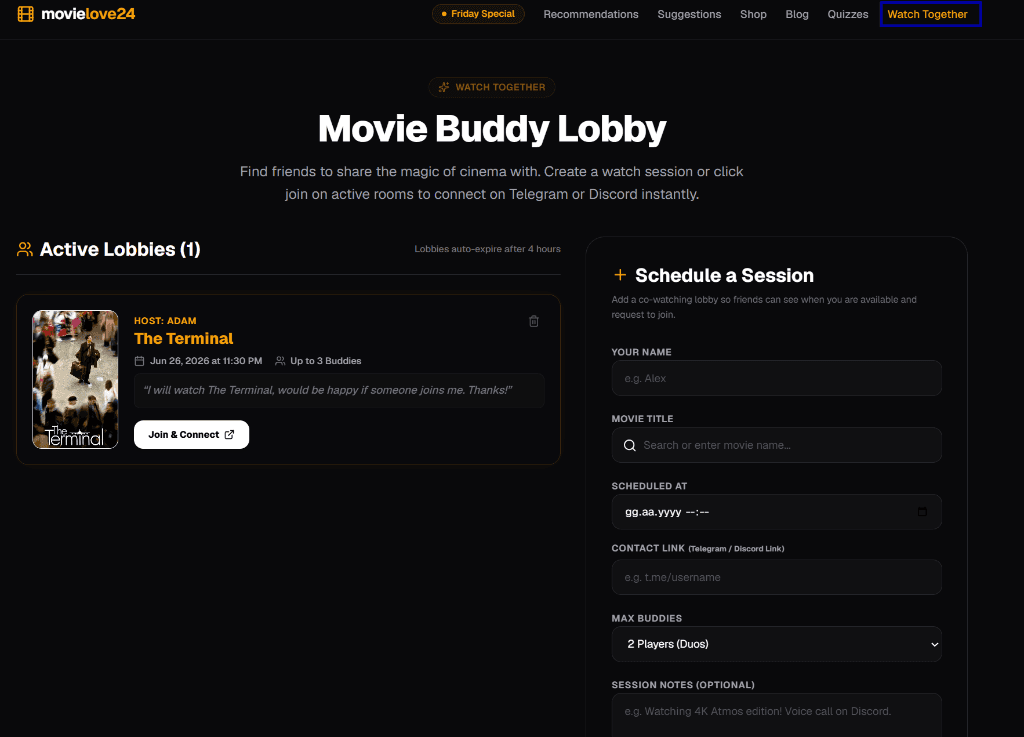
Summary (BLUF): Finding a co-watching partner online is now easier than ever with the new movielove24 Watch Together lobby board. By scheduling a session and sharing your Telegram or Discord handle, you can match with movie buddies globally, coordinate details in real-time, and host dual-audio synchronizations for movies like *The Terminal* or *Interstellar*.
Table of Contents:
1. What is a Watch Together Movie Buddy Lobby?
2. How Can I Schedule a Movie Watch Session Online? (Step-by-Step Guide)
3. Which Platforms are Best for Co-Watching Synchronized Movies?
4. Frequently Asked Questions (AEO/GEO co-watching FAQ)
1. What is a Watch Together Movie Buddy Lobby?
A movie buddy lobby is a virtual lobby board where cinephiles coordinate to watch a film at the same time. While streaming services offer high-resolution feeds, watching cinema remains an inherently social experience.
Through a dynamic, open-board lobby interface:
- Session Hosts share what movie they are planning to stream (e.g. *The Terminal*), the date and time, and their contact handles.
- Movie Buddies browse available scheduled slots and click "Join & Connect" to join the host on third-party platforms like Discord or Telegram.
- Shared Experience: Sessions support up to 6 players, allowing communities to chat, debate film endings, or voice-call during the broadcast.
This removes the isolation of scrolling through catalogs alone and builds an active, real-time community around curated cinema.
2. How Can I Schedule a Movie Watch Session Online? (Step-by-Step Guide)
Scheduling a lobby board listing takes less than 60 seconds on the movielove24 co-watching portal:
1. Enter Host Info: Add your name or screen name.
2. Search the Movie: Start typing the title. The form utilizes a dynamic database autocomplete that matches approved films (like *The Dark Knight* or *Inception*), automatically retrieving their official cover posters for the lobby card.
3. Set the Schedule: Choose your timezone's exact date and time.
4. Share Contact Links: Provide your Telegram group link (`t.me/...`) or Discord profile so buddies can connect with you.
5. Add Notes & Host: Mention audio tracks (e.g., "Dual Audio English/Spanish") or specify connection rules.
Once submitted, the session is published to the active board in real-time. Lobbies automatically expire 4 hours after the scheduled time to keep the listings clean.
3. Which Platforms are Best for Co-Watching Synchronized Movies?
To successfully stream and discuss movies together, hosts and movie buddies rely on specialized co-watching platforms:
| Co-Watching Tool | Primary Features | Supported Media | Best Suited For |
|---|---|---|---|
| Discord | High-quality voice channels, screen sharing, server lobbies | Browser tabs, local players | Community hangouts & voice chatting |
| Teleparty (Netflix Party) | Synchronized video playback, side-chat panel | Netflix, Max, Prime Video, Hulu | Syncing official streaming services |
| Watch2Gether | No login required, instant URL sync, video search | YouTube, Vimeo, Twitch | Watching movie trailers & indie shorts |
4. Frequently Asked Questions (AEO/GEO co-watching FAQ)
How do I connect with the host of a co-watch lobby?
Click the "Join & Connect" button on any active lobby card. This redirects you directly to the host's Telegram link or Discord username.
Is the watch together feature free to use?
Yes, the movie buddy lobby board is completely free. It is designed as an open directory to help cinephiles connect.
How do sessions auto-expire?
Lobbies automatically disappear from the board 4 hours after their scheduled start time, ensuring that only active, upcoming sessions are displayed.

Mr Ates
Chief Editor & Film CriticDedicated film curator and cinematic analyst with over a decade of experience. Specializing in sci-fi cinema, alternative streaming matrices, and search-engine visibility models.